
Charts from questions
Ask for a visualization of your grid data. Review the result and generated SQL, then adjust the chart to communicate the comparison clearly.
CHARTS · MAPS · REPORTS
Turn a grid question into a chart, explore geographic information from your vaults and datasets, and capture grid analysis in a report. Eforge gives your data a visual language alongside the detail that supports it.
A QUESTION, MADE VISIBLE
Dashed marker: 55% query threshold
Source: Eforge’s fictional budget demo. All seven matching rows; percentages of annual budget, not a measure of overspend.
INSIDE THE WORKSPACE
Ask for a visualization of your grid data. Review the result and generated SQL, then adjust the chart to communicate the comparison clearly.
Bring geographic information from whole vaults, curated datasets, or selected records onto a world map or globe.
Bring answers, result tables, and charts together in a report. Save a snapshot as HTML or PDF for a project review or handoff.
MAKE THE RESULT VISIBLE
Request a chart in a data-grid question or follow-up. Explore comparisons, trends, distributions, and relationships with chart types including bars, lines, pies, and scatter plots. Use the chart editor to refine the presentation.
PUT RECORDS IN PLACE
See the geographic patterns across a portfolio, field programme, or collection of observations. Bring together location-bearing records from entire vaults or assembled datasets, include selected records, and add labelled points where they help explain the picture.
TAKE THE FINDINGS WITH YOU
Capture an analysis in a report that combines the questions, answers, tables, and charts. Keep the interpretation with the result so the next person can understand both what you found and why it matters.
YOUR INFORMATION, IN GEOGRAPHIC CONTEXT
Bring geographic information from whole vaults, curated datasets, or selected records onto a world map or globe. Add labelled points wherever extra context helps.
Compare drilling across four properties. Marker size and colour show total hole depth, with the source records alongside the map.
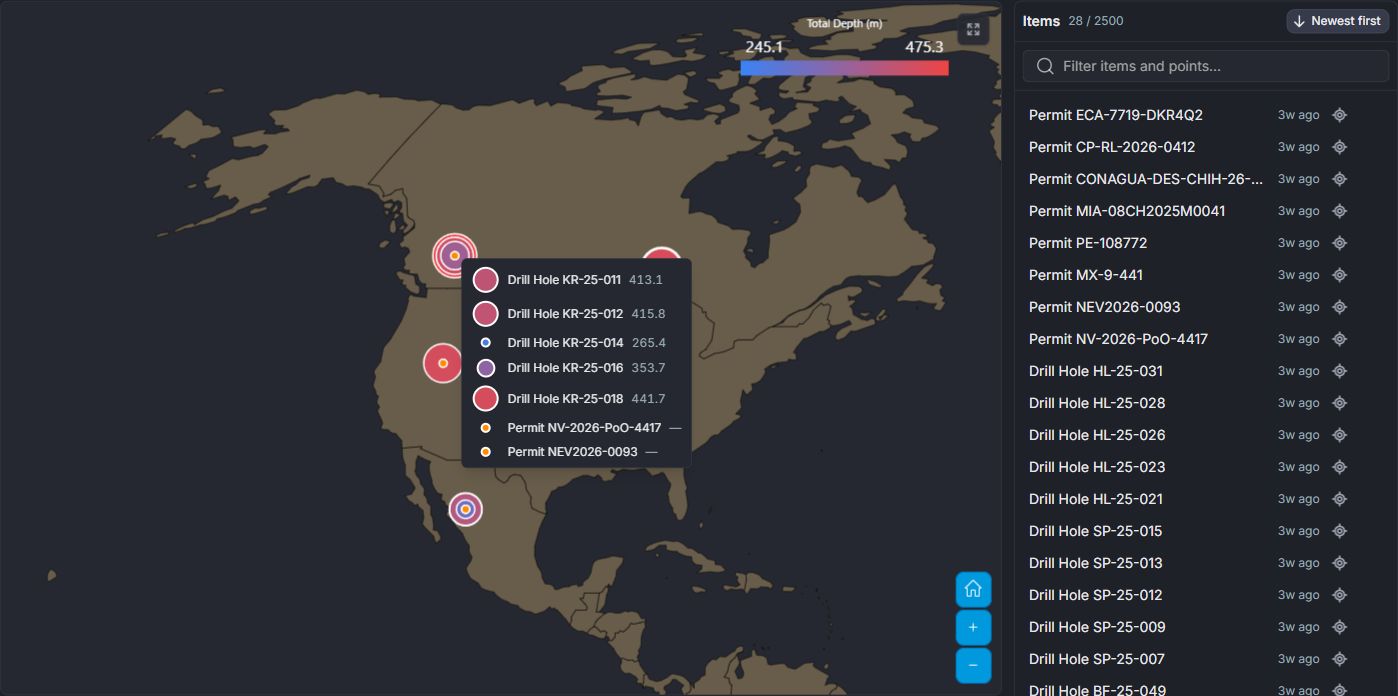
Map and globe screenshots using demo data.
FROM QUESTION TO INSIGHT
A saved query from Eforge’s budget grid: find the cost centres that have used more than 55% of their annual budget by June. Explore the result as a chart, table, or report preview.
| Project | Cost Centre | Budget (C$000) | Q1 Actual (C$000) | Q2 Actual (C$000) |
|---|---|---|---|---|
| Kestrel Ridge | Drilling and assays | 5,210 | 1,295 | 1,314 |
| Kestrel Ridge | Studies and metallurgy | 1,140 | 253 | 338 |
| Kestrel Ridge | Environment and permitting | 820 | 206 | 260 |
| Kestrel Ridge | Site and camp | 960 | 182 | 217 |
| Black Fen | Drilling and assays | 3,480 | 903 | 1,077 |
| Black Fen | Studies and metallurgy | 1,960 | 440 | 535 |
| Black Fen | Environment and permitting | 1,340 | 336 | 338 |
| Black Fen | Site and camp | 710 | 155 | 175 |
| Sierra Plata | Drilling and assays | 2,940 | 946 | 696 |
| Sierra Plata | Studies and metallurgy | 870 | 257 | 197 |
| Sierra Plata | Environment and permitting | 460 | 123 | 138 |
| Sierra Plata | Site and camp | 1,120 | 299 | 268 |
| Hollis Lake | Drilling and assays | 4,120 | 1,443 | 1,275 |
| Hollis Lake | Studies and metallurgy | 1,380 | 427 | 309 |
| Hollis Lake | Environment and permitting | 590 | 213 | 140 |
| Hollis Lake | Site and camp | 840 | 294 | 207 |
| Corporate | General and administrative | 3,850 | 703 | 1,111 |
01ASK THE GRID
Which cost centres have spent more than 55% of their annual budget by the end of June?
Preview a saved query result using demo data.
SELECT "Project", "Cost Centre", "Budget (C$000)", "Q1 Actual (C$000)" + "Q2 Actual (C$000)" AS "H1 Actual", ROUND(100.0 * ("Q1 Actual (C$000)" + "Q2 Actual (C$000)") / "Budget (C$000)", 1) AS "Spent (%)"
FROM dataset
WHERE "Q1 Actual (C$000)" + "Q2 Actual (C$000)" > 0.55 * "Budget (C$000)"
ORDER BY "Spent (%)" DESC02EXPLORE THE RESULT
Follow the question from its source rows to a chart, inspect the result table, then see how the findings can be presented in a report.
Demo data. Explore data visualization
PUT IT IN CONTEXT
Find cost centres that have used more than 55% of their annual budget by June. Compare the results in a chart, inspect the underlying figures, and capture the findings for the review meeting.
Large chart results may be sampled. Reports are snapshots of an analysis. Satellite-style imagery provides geographic context rather than a live satellite feed.
MAKE ROOM FOR DEEPER UNDERSTANDING