
An editor with depth
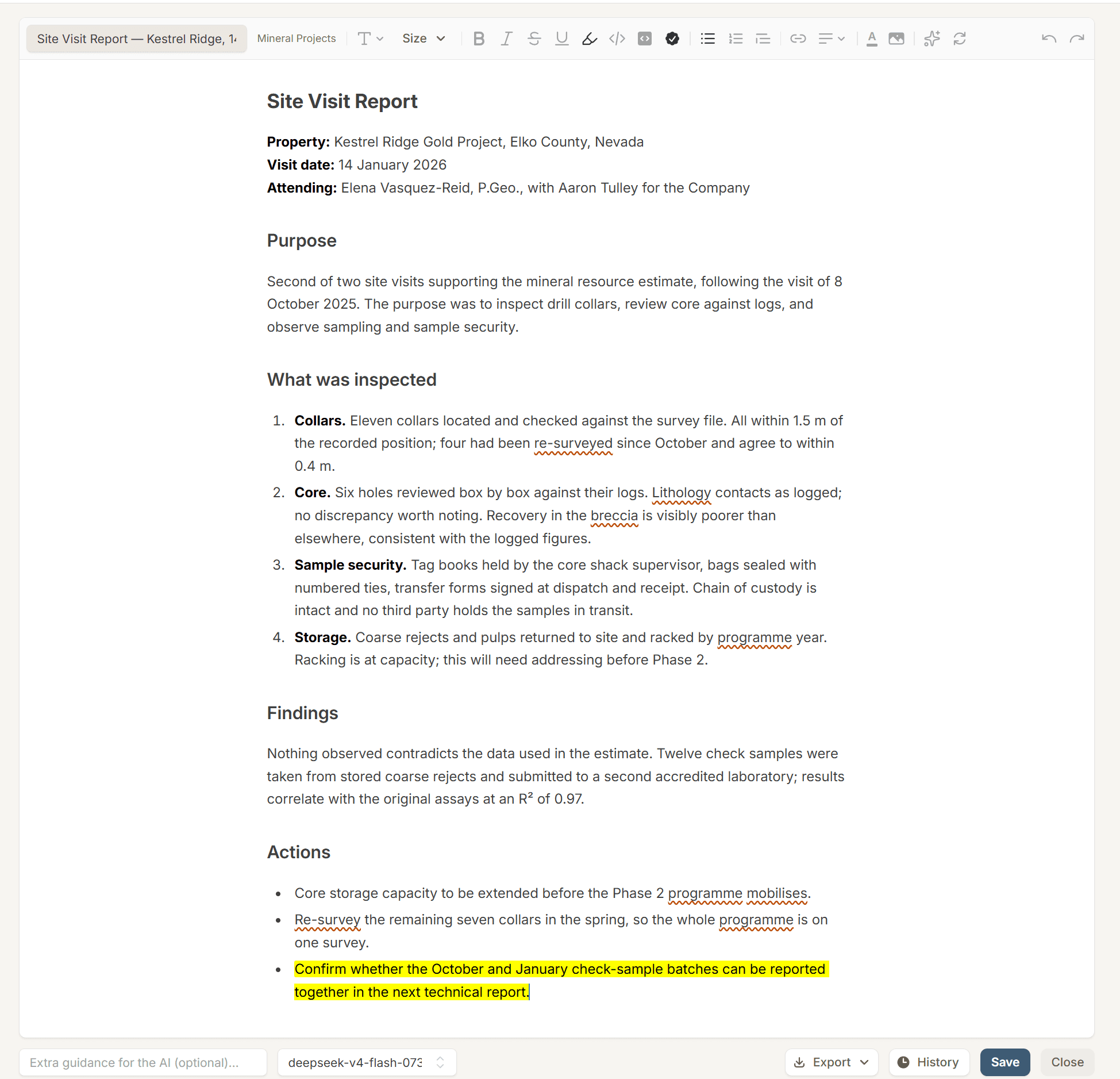
Create rich documents, use AI-assisted editing, and inspect or restore earlier versions as your content develops.
RICH DOCUMENTS · TABULAR QUERIES · REUSABLE ANALYSIS
Write and refine documents. Explore spreadsheet data and structured records. Ask questions of your grids and keep useful analyses for the next time you need them.
| Project | Cost centre | Spent |
|---|---|---|
| Hollis Lake | Drilling and assays | 66.0% |
| Hollis Lake | Environment and permitting | 59.8% |
| Hollis Lake | Site and camp | 59.6% |
INSIDE THE WORKSPACE
Create rich documents, use AI-assisted editing, and inspect or restore earlier versions as your content develops.
Query data grids in natural language, inspect returned results and the generated SQL, and continue exploring with follow-up questions.
Keep saved queries, collect them into query sets, and apply a useful question to another grid or comparison.
DOCUMENTS THAT STAY USEFUL
Draft a report where your reference material lives. Use the document editor’s formatting and AI assistance, then inspect version differences when you need to understand what changed.
EXPLORE THE DATA BEHIND THE STORY
Work with spreadsheet content or selected fields from your records in a data grid. Use filtering, grouping, charting, and questions to explore the information from different angles.
FROM QUESTION TO INSIGHT
A saved query from Eforge’s budget grid: find the cost centres that have used more than 55% of their annual budget by June. Explore the result as a chart, table, or report preview.
| Project | Cost Centre | Budget (C$000) | Q1 Actual (C$000) | Q2 Actual (C$000) |
|---|---|---|---|---|
| Kestrel Ridge | Drilling and assays | 5,210 | 1,295 | 1,314 |
| Kestrel Ridge | Studies and metallurgy | 1,140 | 253 | 338 |
| Kestrel Ridge | Environment and permitting | 820 | 206 | 260 |
| Kestrel Ridge | Site and camp | 960 | 182 | 217 |
| Black Fen | Drilling and assays | 3,480 | 903 | 1,077 |
| Black Fen | Studies and metallurgy | 1,960 | 440 | 535 |
| Black Fen | Environment and permitting | 1,340 | 336 | 338 |
| Black Fen | Site and camp | 710 | 155 | 175 |
| Sierra Plata | Drilling and assays | 2,940 | 946 | 696 |
| Sierra Plata | Studies and metallurgy | 870 | 257 | 197 |
| Sierra Plata | Environment and permitting | 460 | 123 | 138 |
| Sierra Plata | Site and camp | 1,120 | 299 | 268 |
| Hollis Lake | Drilling and assays | 4,120 | 1,443 | 1,275 |
| Hollis Lake | Studies and metallurgy | 1,380 | 427 | 309 |
| Hollis Lake | Environment and permitting | 590 | 213 | 140 |
| Hollis Lake | Site and camp | 840 | 294 | 207 |
| Corporate | General and administrative | 3,850 | 703 | 1,111 |
01ASK THE GRID
Which cost centres have spent more than 55% of their annual budget by the end of June?
Preview a saved query result using demo data.
SELECT "Project", "Cost Centre", "Budget (C$000)", "Q1 Actual (C$000)" + "Q2 Actual (C$000)" AS "H1 Actual", ROUND(100.0 * ("Q1 Actual (C$000)" + "Q2 Actual (C$000)") / "Budget (C$000)", 1) AS "Spent (%)"
FROM dataset
WHERE "Q1 Actual (C$000)" + "Q2 Actual (C$000)" > 0.55 * "Budget (C$000)"
ORDER BY "Spent (%)" DESC02EXPLORE THE RESULT
Follow the question from its source rows to a chart, inspect the result table, then see how the findings can be presented in a report.
Demo data. Explore data visualization
PUT IT IN CONTEXT
Collect project records into a grid. Compare budgets or review dates, save the questions you return to, and use a document to explain the findings with links to the underlying material.
AI-generated queries and summaries should be reviewed against the underlying data. The example above uses sample content to illustrate the experience.
MAKE ROOM FOR DEEPER UNDERSTANDING